

A website can have great content and still perform poorly.
The problem may not be the content itself.
It may be the structure around it.
Users need to know:
- where they are;
- where to go next;
- how pages relate;
- how to reach important information.
Search engines need many of the same signals.
That is where site architecture for SEO becomes important.
Good architecture helps organize a website around clear purposes.
It connects:
pages → sections → hubs → navigation → internal links → user journeys.
But good SEO architecture is not simply:
Put every page three clicks from the homepage.
It is also not:
Create lots of categories and add every URL to the menu.
A useful architecture answers three bigger questions:
- Which pages should exist?
- Where should each page belong?
- How should users and search engines reach it?
This guide explains how to answer all three.
Quick Answer: What Is Site Architecture for SEO?
Site architecture for SEO is the way a website's pages are organized, prioritized, grouped, and connected so users and search engines can discover and understand important content efficiently.
It includes:
- website hierarchy;
- navigation;
- page relationships;
- categories;
- internal links;
- breadcrumbs;
- topic hubs;
- crawl paths;
- URL organization.
Google uses links to discover pages and as signals for understanding relevance. It also recommends ensuring that every important page has at least one internal link from another page on the site.
So architecture is not just visual organization.
It affects how the website actually works.
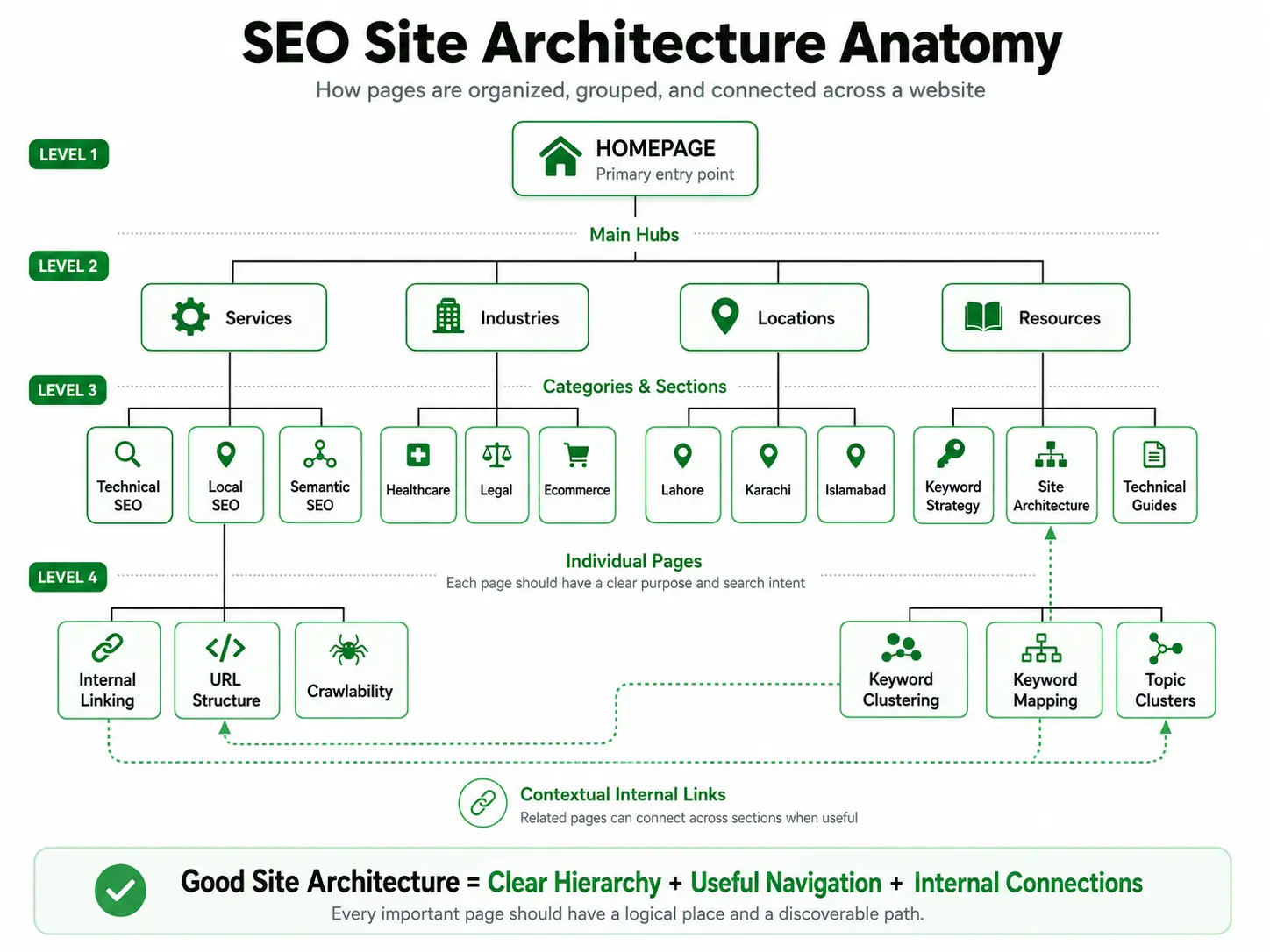
A Simple Definition of Website Structure
Website structure describes how pages are arranged and connected.
For example:
Homepage
├── Services
│   ├── Technical SEO
│   ├── Local SEO
│   └── Semantic SEO
├── Industries
├── Locations
├── Resources
└── Contact
This is a hierarchy.
But actual site architecture goes further.
A Technical SEO page might also contextually link to:
- Internal Linking;
- URL Structure;
- Site Architecture;
- SEO Audits.
Those connections may cross different branches of the hierarchy.
That means your architecture is not only a tree.
It is also a network of useful relationships.
Site Architecture vs Website Structure: Is There a Difference?
In everyday SEO discussions, the terms are often used interchangeably.
But a practical distinction can help.
| Concept | Main Question |
|---|---|
| Website Structure | How are pages arranged? |
| Site Architecture | How does the entire site system work? |
| Website Hierarchy | Which pages are parents, children, or siblings? |
| Information Architecture | How should information be categorized and labeled for people? |
| Navigation | How do users move around the site? |
| Taxonomy | How is content classified? |
| Internal Linking | Which relevant pages should connect contextually? |
| URL Structure | How should individual web addresses be formatted? |
| Topic Clusters | Which related pages form a subject ecosystem? |
| XML Sitemap | Which canonical URLs are submitted for discovery? |
The distinctions matter because fixing one does not automatically fix the others.
A clean URL does not guarantee good navigation.
A sitemap does not fix orphan pages.
A topic cluster does not automatically create a strong site hierarchy.
Site Architecture vs Information Architecture
Information architecture begins with people.
It asks:
- What information do users need?
- How do they mentally group it?
- What labels make sense?
- What should be easy to find?
SEO site architecture applies those decisions to an actual website while also considering:
- crawlability;
- internal links;
- indexability;
- page priority;
- search intent;
- site scalability.
A strong architecture should serve both.
Do not build a website that only makes sense inside an SEO spreadsheet.
It must make sense to users too.
Why Does Site Architecture Matter for SEO?
Site architecture affects several important areas.
1. Page Discovery
Google discovers many URLs by following links from pages it already knows.
A category page, hub page, navigation menu, or contextual link can lead Google to another page.
If an important page has no meaningful inbound internal links, discovery becomes harder.
2. Crawlability
Links should use crawlable HTML.
Google generally expects links to use an <a> element with an href attribute.
Architecture built around non-crawlable interactions can make discovery less reliable.
3. Context
Internal links provide context.
Technical SEO → Internal Linking
Keyword Mapping → Internal Linking
Those relationships help users understand how subjects connect.
Google also recommends descriptive, concise anchor text that makes sense to people and search engines.
4. Page Priority
Important pages should not be hidden.
They should normally receive stronger access through:
- navigation;
- hubs;
- categories;
- contextual links;
- relevant supporting pages.
This does not mean linking every important page directly from the homepage.
It means providing clear paths.
5. User Experience
Good architecture reduces friction.
Users should not need to repeatedly:
- return to Google;
- use site search;
- guess URLs;
- click through unrelated sections.
The next useful step should be reasonably obvious.
6. Sitelinks
Google says its systems analyze a site's link structure when selecting sitelinks.
It recommends:
- logical site structure;
- relevant page titles and headings;
- links to important pages;
- concise and relevant anchor text.
Sitelinks are automated.
Good architecture can help.
But they are not guaranteed.
What Does Good SEO Site Architecture Look Like?
A strong structure usually has these characteristics.
| Characteristic | What It Means |
|---|---|
| Clear hierarchy | Major sections are easy to understand |
| Page ownership | Important intents have clear URL owners |
| Reasonable depth | Important pages are not unnecessarily buried |
| Contextual links | Related pages connect where useful |
| No critical orphan pages | Important pages receive inbound links |
| Simple navigation | Users can predict where information lives |
| Scalable taxonomy | New pages can be added without chaos |
| Clean URLs | Addresses are readable and manageable |
| Useful breadcrumbs | Users understand their location/path |
| Low duplication | Multiple URLs do not unnecessarily serve the same purpose |
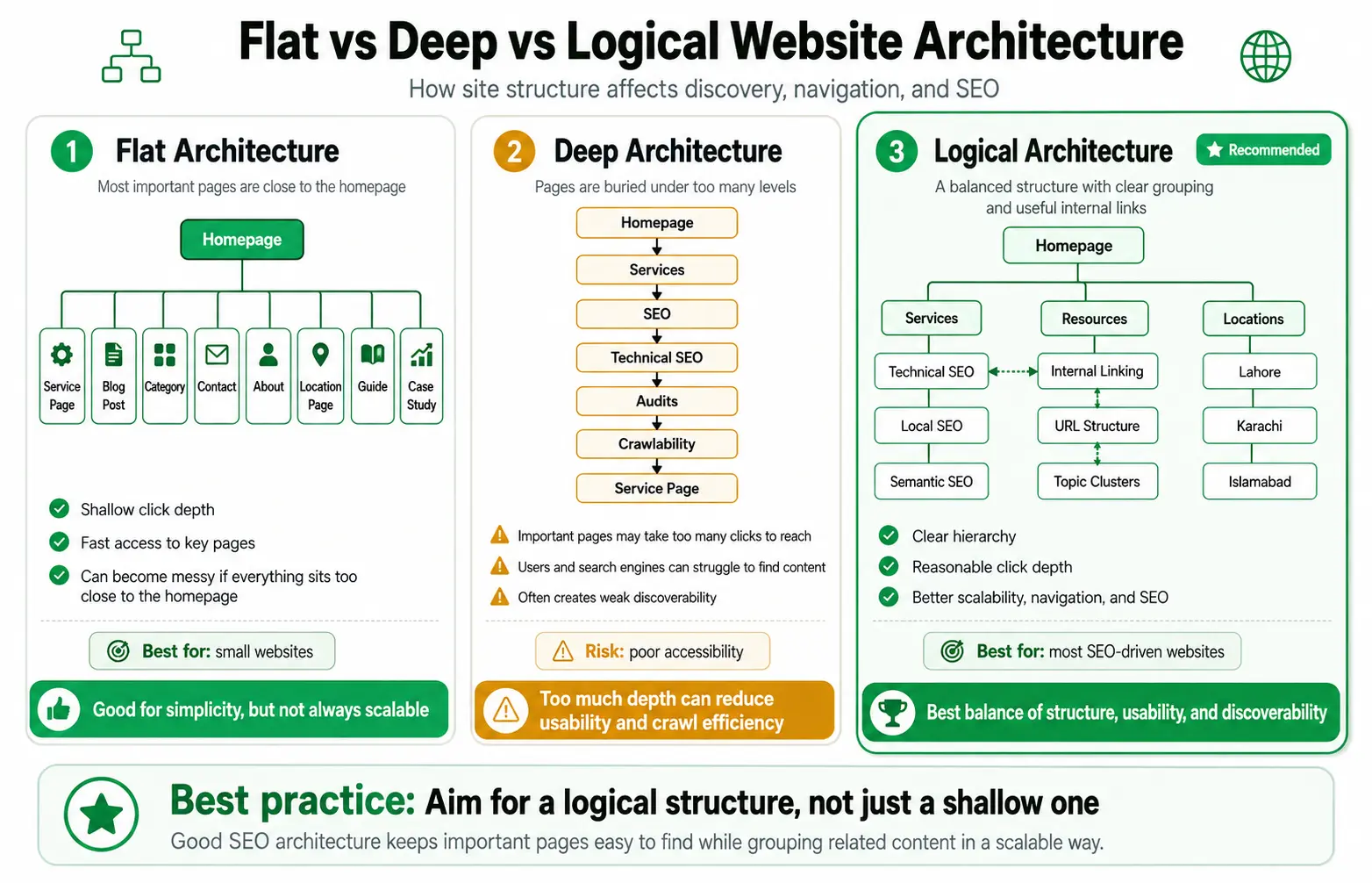
Flat vs Deep vs Logical Website Architecture
SEO guides often say:
Flat architecture is good. Deep architecture is bad.
That is too simplistic.
Flat Architecture
Many important pages sit close to the homepage.
Homepage
├── Service A
├── Service B
├── Blog
├── About
├── Locations
└── Contact
Advantages
- Simple.
- Few levels.
- Easy for small sites.
Problem
A 500-page website cannot realistically place everything at the same level.
The structure becomes noisy.
Deep Architecture
Pages sit under many nested layers.
Homepage
└── Services
    └── SEO
        └── Technical SEO
            └── Audits
                └── Crawlability
                    └── Page
The deeper the path becomes, the easier it is for important pages to become buried.
Logical Architecture
A logical structure balances:
- hierarchy;
- grouping;
- page priority;
- navigation;
- internal links;
- scalability.
Homepage
├── Services
│   ├── Technical SEO
│   ├── Local SEO
│   └── Semantic SEO
├── Resources
│   ├── Internal Linking
│   ├── URL Structure
│   └── Topic Clusters
└── Locations
    ├── Lahore
    ├── Karachi
    └── Islamabad
The goal is not:
Make everything shallow.
The goal is:
Keep important content logically grouped and reasonably easy to reach.
Is Flat Website Architecture Always Better?
No.
Imagine this:
Homepage
├── Page 1
├── Page 2
├── Page 3
├── Page 4
├── ...
└── Page 500
Technically shallow.
Practically terrible.
Users now face hundreds of choices.
A better model is:
Homepage
├── Services
├── Industries
├── Locations
└── Resources
Then create logical subgroups.
Flatness is useful.
Logical grouping is more important.
How Many Clicks Should Important Pages Be From the Homepage?
You will often hear:
Every page should be within three clicks.
Treat that as a heuristic.
Not a Google rule.
Google's actual documentation emphasizes:
- crawlable links;
- logical site structure;
- relevant internal links;
- ensuring important pages have inbound links.
It does not prescribe one universal three-click threshold.
For many websites, keeping major pages within a few meaningful clicks is sensible.
But context matters.
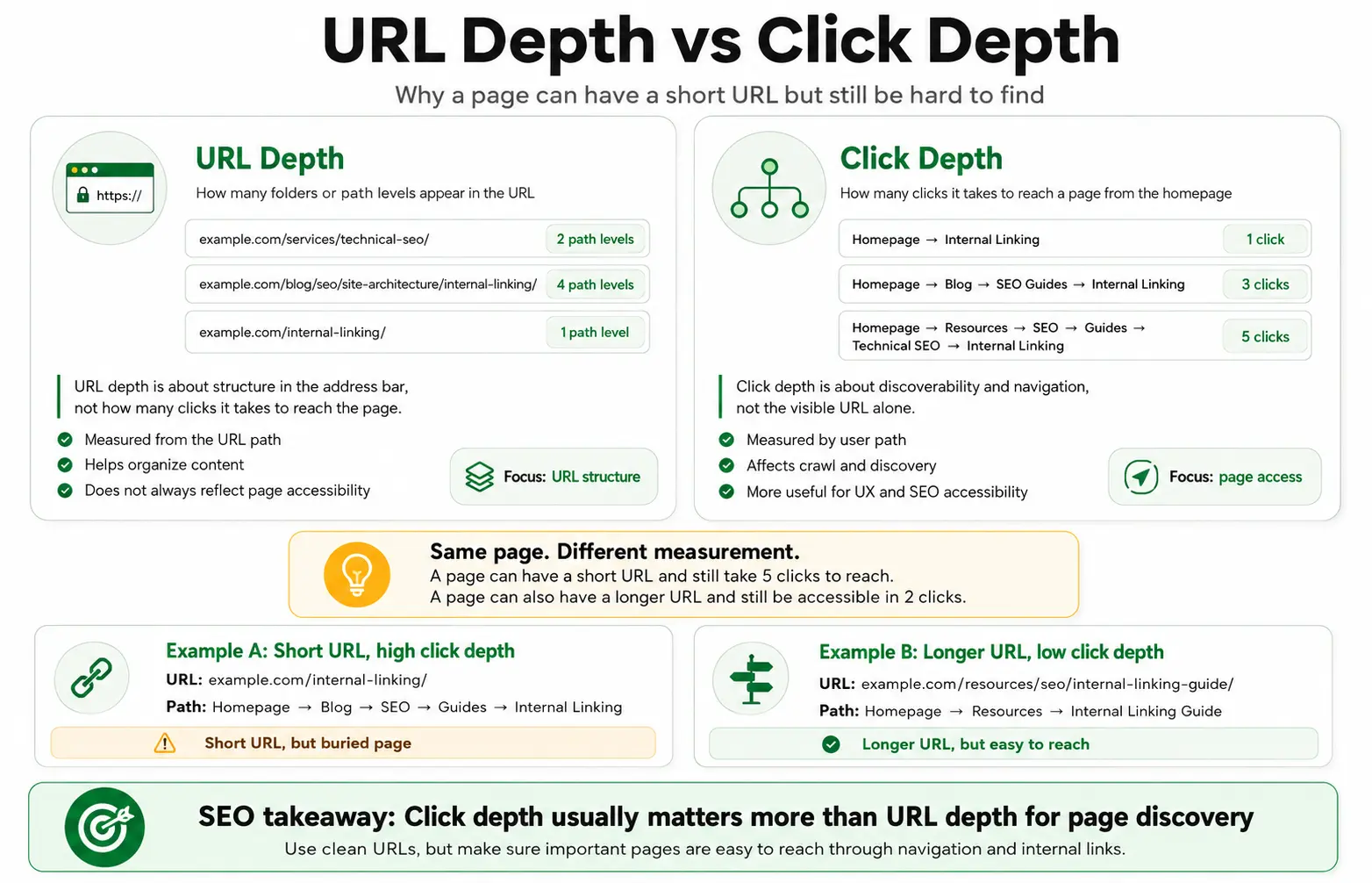
URL Depth vs Click Depth: They Are Not the Same
This distinction is frequently misunderstood.
URL Depth
URL depth refers to the visible path in a URL.
example.com/services/seo/technical/audits/It appears deep.
Click Depth
Click depth describes how many link interactions are required to reach a page from a starting point such as the homepage.
Homepage → Services → Technical SEO → Audit
That is three clicks.
Why the Difference Matters
Consider:
Page A
URL:
example.com/internal-linking/
But path:
Home → Resources → SEO → Guides → Technical SEO → Internal Linking
Short URL. High click depth.
Page B
URL:
example.com/resources/seo/internal-linking-guide/
But path:
Home → Resources → Internal Linking Guide
Longer URL. Low click depth.
Page B may be easier to discover despite having the longer URL.
Architecture Is Not the Same as Folder Structure
Your architecture is the path users and crawlers can actually follow—not just the folders visible inside a URL.
A beautiful folder hierarchy cannot rescue a page nobody links to.
Likewise, a short root-level URL does not automatically make a page important.
Real architecture is created through:
- page hierarchy;
- navigation;
- internal links;
- hubs;
- breadcrumbs;
- contextual connections.
How to Plan a Website Structure for SEO
Planning should start before you draw a sitemap diagram.
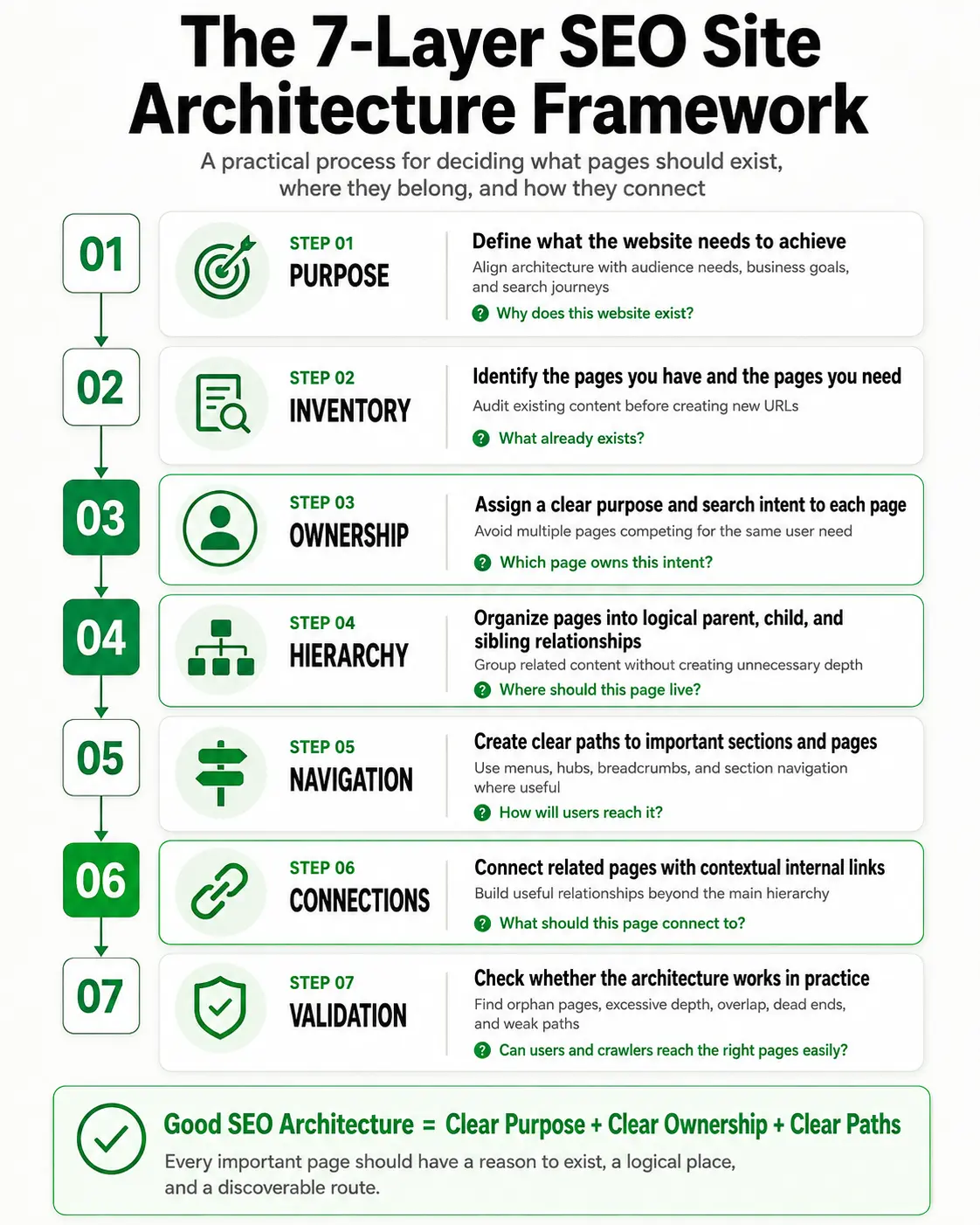
The 7-Layer SEO Site Architecture Framework
Layer 1: Purpose
Ask:
Why does this website exist?
Define:
- business goals;
- audience;
- products/services;
- conversion goals;
- primary user journeys.
A SaaS site and a local service site need different architecture.
Layer 2: Inventory
What already exists?
For an existing website, inventory:
- indexable URLs;
- services;
- location pages;
- categories;
- blog posts;
- products;
- landing pages;
- utility pages.
For a new website, identify what genuinely needs to exist.
Do not start publishing yet.
Layer 3: Ownership
Which page owns this intent?
This is one of the most important steps.
| User Need | Page Owner |
|---|---|
| Learn internal linking | Internal Linking guide |
| Assign keywords to URLs | Keyword Mapping |
| Organize related pages | SEO Topic Clusters |
| Organize entire website | Site Architecture |
Clear ownership reduces unnecessary page overlap.
Layer 4: Hierarchy
Where should this page live?
Define:
- parent pages;
- child pages;
- siblings;
- hubs;
- categories.
Hierarchy should help users predict where content belongs.
Layer 5: Navigation
How will users reach important destinations?
Possible mechanisms:
- header navigation;
- mega menus;
- section navigation;
- breadcrumbs;
- footer links;
- category hubs;
- search.
Not every important page belongs in the header.
Layer 6: Connections
What should this page connect to?
Contextual internal links connect related concepts beyond the formal hierarchy.
For example:
Keyword Mapping → Internal Linking
Internal Linking → Topic Clusters
Layer 7: Validation
Does the structure actually work?
Check for:
- orphan pages;
- excessive click depth;
- duplicate intents;
- broken links;
- dead ends;
- unnecessary categories;
- inconsistent navigation;
- isolated sections.
Architecture is not complete when the diagram looks good. It is complete when the paths work.
Need a clearer website structure?
Turn scattered pages into a logical SEO architecture.
If your site has overlapping pages, unclear hierarchy, weak internal links, or important pages buried too deep, a structured SEO review can help identify what should stay, move, merge, or be strengthened.
Discuss Your Website Architecture →How to Decide Where a Page Belongs
Before placing a page inside the website, answer these questions.
| Question | Why It Matters |
|---|---|
| Why does this page exist? | Defines purpose |
| Which intent does it own? | Prevents overlap |
| What is its parent? | Defines hierarchy |
| Which pages are its siblings? | Defines grouping |
| How important is it? | Determines prominence |
| Where should users first discover it? | Guides navigation |
| Which pages should link to it? | Builds context |
| What should users do next? | Supports conversion journey |
If you cannot clearly answer these questions, the page may not be ready to publish.
Parent, Child, and Sibling Pages Explained
Imagine:
Parent
Technical SEO
Children
- Crawlability
- Indexing
- Internal Linking
Siblings
Internal Linking and Crawlability are sibling topics.
A parent page should usually help users understand the larger category.
A child page should go deeper into its own distinct need.
Sibling pages may link contextually when their topics genuinely connect.
How Topic Clusters Fit Into Site Architecture
A topic cluster organizes related pages around a subject.
Site architecture organizes the entire website.
Website
│
├── Services
│
├── Industries
│
├── Locations
│
└── Resources
     │
     └── SEO Content Architecture Cluster
          ├── Keyword Clustering
          ├── Keyword Mapping
          ├── URL Structure
          ├── Internal Linking
          ├── SEO Topic Clusters
          └── Site Architecture
The cluster is one ecosystem.
The architecture contains many ecosystems.
How Keyword Mapping Fits Into Site Architecture
Keyword mapping helps decide:
Which URL owns which search intent?
Architecture then asks:
Where should that URL sit inside the site?
Keyword Research → Keyword Clustering → Keyword Mapping → Page Ownership → Architecture → Internal Linking
Skipping ownership can lead to duplicate or competing pages.
Internal Linking vs Site Architecture
These are closely related.
But not identical.
Site architecture
Defines the broader structure.
Internal linking
Creates individual connections inside that structure.
For example:
Resources
└── SEO Guides
    └── Internal Linking
Contextual internal linking may additionally connect:
Internal Linking ↔ Keyword Mapping
For deeper implementation, see the Internal Linking guide.
URL Structure vs Site Architecture
A URL answers:
What does this page's address look like?
Example:
/services/technical-seo/
Architecture answers:
Where does this page belong and how is it reached?
Do not confuse the two.
For the URL-specific process, read the SEO-friendly URL structure guide.
How to Structure Website Navigation
Navigation should prioritize user needs.
Header Navigation
Use it for major destinations.
- Services
- Industries
- Locations
- About
- Resources
- Contact
Do not put every SEO keyword in the menu.
Mega Menu
Useful for larger websites.
Avoid:
- dozens of ungrouped links;
- keyword stuffing;
- duplicate links;
- overwhelming users.
Section Navigation
A section may need navigation independent of the global menu.
Technical SEO
→ Crawlability
→ Indexing
→ Internal Linking
→ Canonicals
Footer Navigation
The footer can support:
- utility pages;
- important secondary destinations;
- contact information;
- legal pages;
- selected service/category links.
It should not become a dump of hundreds of keyword-rich links.
Mobile Site Architecture Matters Too
Mobile navigation is not only a design issue.
Google uses mobile-first indexing.
If an important link is accessible on desktop but removed from the mobile experience, that can change how easily the page is discoverable through the mobile-rendered site.
Keep critical internal discovery paths available across devices.
How Breadcrumbs Support Site Architecture
Breadcrumbs help users understand where they are.
Home → Services → Technical SEO → Internal Linking
They can provide:
- orientation;
- parent context;
- quick navigation.
One important nuance:
Google recommends breadcrumbs that represent a typical user path.
They do not need to mechanically mirror the URL folder structure.
So /internal-linking/ can still use Home → Resources → SEO Guides → Internal Linking if that accurately reflects the user journey.
Categories and Tags: When Should You Use Them?
Categories can help group meaningful sets of content.
Tags can also help.
But every taxonomy page does not automatically deserve indexation.
Ask:
- Does this category help users?
- Does it group a meaningful set of content?
- Does it contain useful context?
- Could it satisfy its own search/user need?
- Is it substantially different from another archive?
Avoid generating hundreds of thin taxonomy URLs.
Architecture should reduce clutter.
Not create it.
What Is an Orphan Page?
An orphan page has no meaningful inbound internal links from the site's crawlable architecture.
The page may technically exist.
It may even appear in an XML sitemap.
But users and crawlers may have difficulty reaching it naturally.
Important pages should normally receive contextual or navigational inbound links.
XML Sitemap vs Site Architecture
An XML sitemap is useful.
A sitemap is not a substitute for architecture.
Google may discover URLs through:
- crawlable links;
- known URLs;
- submitted sitemaps.
A sitemap helps communicate URLs.
It does not provide users with navigation.
It also does not create contextual page relationships in the way internal links do.
For important pages, aim for both: good architecture + accurate sitemap.
Does Site Architecture Affect Crawl Budget?
Yes.
But this concept is often overused.
Google's current crawl-budget guidance says the topic is mainly relevant to very large or rapidly changing sites.
Its rough examples include:
- 1 million+ URLs changing moderately often;
- 10,000+ URLs changing daily;
- sites with large numbers of URLs in Discovered – currently not indexed.
For a normal service business with 100 pages, crawl-budget optimization is unlikely to be the main problem.
Focus first on:
- crawlable links;
- indexability;
- duplication;
- orphan pages;
- broken links;
- clear hierarchy.
Site Architecture for Service Websites
A service website might use:
Home
├── Services
│   ├── Technical SEO
│   ├── Local SEO
│   └── Semantic SEO
├── Industries
│   ├── Healthcare
│   ├── Legal
│   └── Real Estate
├── Locations
├── Resources
├── About
└── Contact
The important distinction is:
Services
What you do.
Industries
Who you help.
Locations
Where you serve.
Resources
What users can learn.
Do not mix all four purposes into one giant services section.
Site Architecture for Ecommerce Websites
Ecommerce architecture often begins with:
Home
└── Category
    └── Subcategory
        └── Product
But real ecommerce sites are more complex.
You may also need to manage:
- filters;
- sorting;
- pagination;
- faceted navigation;
- parameter URLs;
- product variants;
- duplicate URLs.
A careless filter system can generate thousands or millions of low-value URL combinations.
For ecommerce-specific strategy, see Ecommerce SEO.
Site Architecture for SaaS Websites
A SaaS structure may include:
Home
├── Product
├── Features
├── Solutions
├── Use Cases
├── Integrations
├── Pricing
├── Resources
└── Company
The biggest mistake is creating overlapping pages such as:
- Feature X;
- Feature X Software;
- Feature X Tool;
- Feature X Platform;
when they all serve the same need.
Architecture begins with ownership. Not keyword variations.
Site Architecture for Local and Multi-Location Businesses
A location-based business may use:
Home
├── Services
└── Locations
    ├── Lahore
    ├── Islamabad
    └── Karachi
Each location page should have a real reason to exist.
Avoid creating hundreds of near-identical city pages with only the place name changed.
For broader local optimization, see Local SEO.
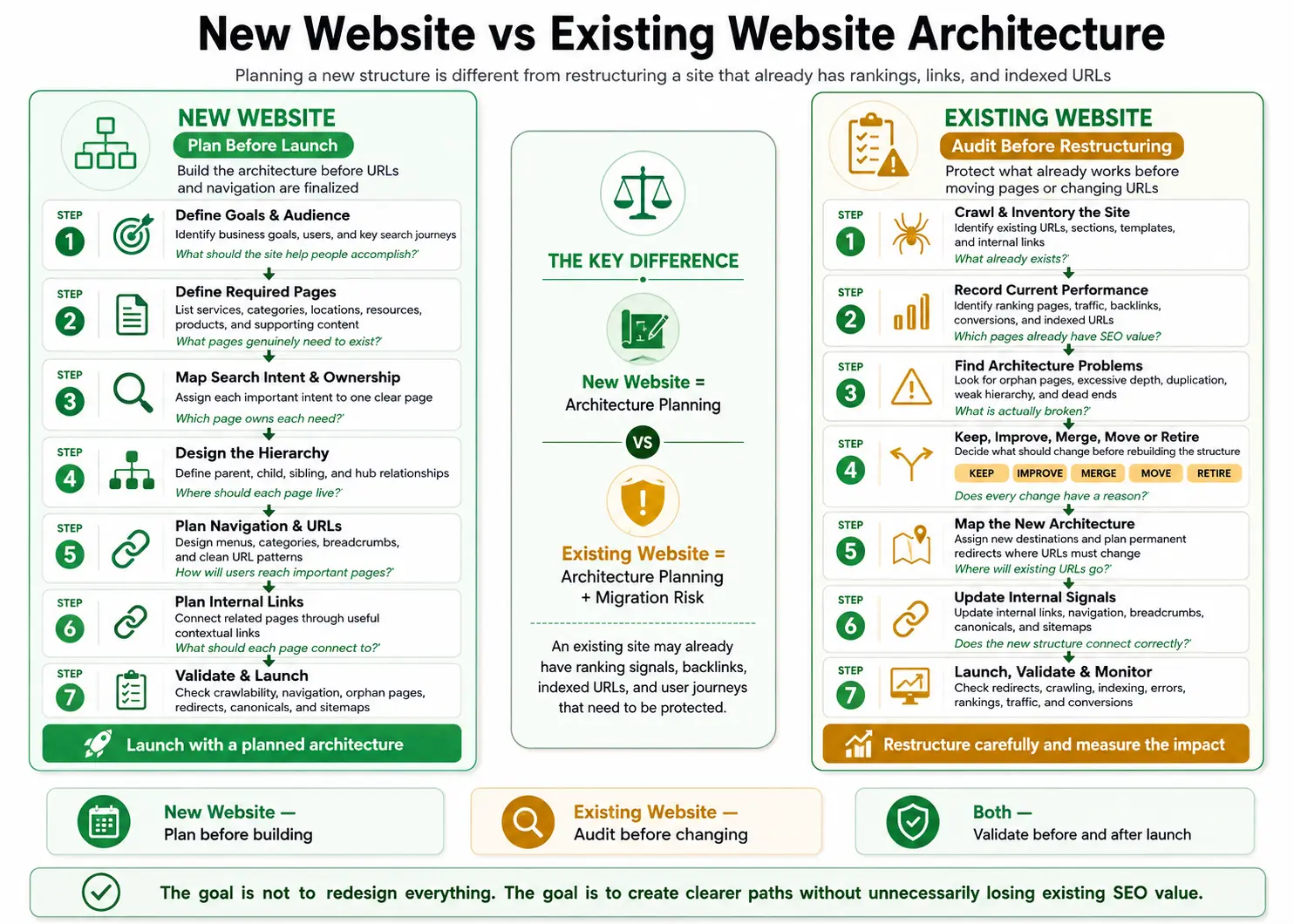
New Website vs Existing Website Architecture
The workflow changes depending on whether the site already exists.
| New Website | Existing Website |
|---|---|
| Plan before publishing | Audit before changing |
| Define required pages | Inventory current pages |
| Map page ownership | Identify existing winners |
| Create hierarchy | Diagnose problems |
| Design navigation | Protect valuable paths |
| Establish URLs | Map old URLs to new |
| Launch | Migrate carefully |
This distinction matters.
An existing website may already have:
- rankings;
- backlinks;
- traffic;
- indexed URLs;
- conversions.
Changing architecture carelessly can destroy value that already exists.
How to Audit an Existing Website Architecture
Start with an inventory.
Pages
- Which URLs exist?
- Which are indexed?
- Which generate traffic?
- Which convert?
Hierarchy
- Which sections exist?
- Are categories logical?
- Are some sections duplicated?
Internal Links
- Which pages receive many internal links?
- Which important pages receive almost none?
Click Depth
Which pages are hard to reach?
Orphans
Which indexable pages have no useful inbound links?
Navigation
Do menus reflect actual business priorities?
Search Intent
Are several pages competing for the same intent?
Architecture Audit Table
| Problem | Why It Matters | Possible Action |
|---|---|---|
| Orphan page | Poor discoverability | Add contextual links |
| Excessive depth | Harder navigation | Create hub/shorter path |
| Duplicate intent | Cannibalization risk | Merge/remap |
| Broken links | Dead-end paths | Repair |
| Empty category | Thin architecture | Remove/consolidate |
| Huge menu | Poor UX | Simplify |
| Important page buried | Weak visibility | Strengthen pathways |
| Duplicate taxonomy | Confusion | Consolidate |
| Weak mobile links | Discovery gap | Align key navigation |
How to Restructure a Website Without Losing SEO
Step 1: Record the Current State
Before changing anything, capture:
- current rankings;
- organic traffic;
- backlinks;
- conversions;
- indexed URLs;
- internal links.
You need a baseline.
Step 2: Decide What Actually Needs to Change
| Decision | Meaning |
|---|---|
| Keep | Page already works |
| Improve | Purpose is good, execution is weak |
| Merge | Multiple URLs serve one need |
| Move | Page belongs elsewhere |
| Retire | Page no longer provides value |
Do not rebuild architecture simply because you want a cleaner diagram.
Step 3: Map Old URLs to New URLs
If a URL must change, map the old address to the most relevant new destination.
Step 4: Use Appropriate Redirects
For permanent URL changes, use permanent redirects.
Then update internal links to point directly to final destinations rather than relying permanently on redirect chains.
Step 5: Update Internal Signals
Review:
- navigation;
- contextual links;
- breadcrumbs;
- canonicals;
- XML sitemap;
- structured data where relevant.
Step 6: Test
- broken links;
- redirect chains;
- missing pages;
- accidental noindex;
- canonical errors;
- mobile navigation;
- crawlability.
Step 7: Monitor
After launch, monitor:
- indexing;
- rankings;
- traffic;
- conversions;
- errors;
- crawl behavior.
Architecture changes should be measured. Not assumed successful.
Planning to restructure an existing website?
Before changing navigation, folders, page ownership, or URLs, protect the rankings, links, and traffic that already exist.
Request an SEO Architecture Review →Common Site Architecture Mistakes
Building Around Keywords Instead of Users
A keyword tool does not know your entire business.
Use keyword research as input. Not as the architecture itself.
Creating a Page for Every Keyword
Similar keywords can share one intent.
Do not create separate versions of the same architecture guide simply because the wording changes.
Treating Three Clicks as a Law
Three clicks can be a useful goal. It is not a universal Google requirement.
Assuming Short URLs Mean Shallow Architecture
URL depth and click depth are different.
Putting Everything in the Header
Navigation should prioritize. Not list the entire website.
Relying on XML Sitemaps to Fix Orphans
A sitemap does not create contextual internal links.
Linking Every Page to Every Page
More links are not automatically better. Link where users benefit.
Creating Hundreds of Thin Tags
Taxonomy should organize meaningful content. Not generate indexable clutter.
Ignoring Mobile Navigation
Important discovery paths should work on mobile too.
Changing Existing URLs Without a Migration Plan
URL stability matters. Do not create avoidable redirects.
Site Architecture for AI Overviews and AI Mode
There is no special “AI site architecture.”
Google says the same SEO fundamentals remain relevant for AI Overviews and AI Mode.
It specifically highlights:
- crawlable content;
- internal discoverability;
- good page experience;
- important information in text;
- useful images/video;
- accurate structured data.
Google also says AI features may use query fan-out.
A strong architecture can therefore help by making your broader content ecosystem:
- discoverable;
- focused;
- well connected;
- non-duplicative.
But architecture does not guarantee an AI Overview citation.
Should You Build Pages for Every AI Fan-Out Query?
No.
Instead:
Same intent?
Strengthen one page.
Different intent?
Consider a separate page.
Minor supporting question?
Answer it in the relevant section.
This is the same page-ownership principle used throughout good architecture.
Site Architecture for ChatGPT Search
There is no guaranteed ChatGPT Search ranking formula.
Public websites can appear in ChatGPT Search.
For practical visibility:
- keep important pages publicly accessible;
- do not block OAI-SearchBot if you want ChatGPT Search inclusion;
- create clear page purposes;
- support claims with evidence;
- keep information current.
Does Schema Fix Bad Site Architecture?
No.
Structured data can help machines understand specific information.
It cannot fix:
- orphan pages;
- confusing navigation;
- duplicate intents;
- inaccessible links;
- weak page ownership.
Use structured data where appropriate. Do not use it as a substitute for architecture.
Can Better Architecture Help Google Sitelinks?
It can help Google understand useful site shortcuts.
Google recommends:
- logical site structure;
- compact, informative titles;
- relevant headings;
- links to important pages;
- concise anchor text.
But sitelinks remain automated.
You cannot force them.
How to Measure Site Architecture
Do not judge architecture only by appearance.
Track practical signals.
| Metric | What It Reveals |
|---|---|
| Average click depth | How buried pages are |
| Orphan URLs | Discovery gaps |
| Internal links per important page | Connectivity |
| Broken internal links | Dead ends |
| Indexable URLs | Search inventory |
| Indexed vs intended URLs | Indexation quality |
| Duplicate ranking URLs | Potential cannibalization |
| Organic traffic by section | Section performance |
| Conversions by section | Business value |
| Navigation behavior | UX usefulness |
| Crawl errors | Technical access issues |
A Practical SEO Site Architecture Example
Consider this model:
                            Homepage
                               │
          ┌────────────────────┼────────────────────┐
          │                    │                    │
       Services             Industries           Locations
          │                    │                    │
    Technical SEO          Healthcare            Lahore
    Local SEO              Legal                 Karachi
    Semantic SEO           Real Estate           Islamabad
          │
          └──────────────── Resources
                               │
                    Keyword Clustering
                    Keyword Mapping
                    URL Structure
                    Internal Linking
                    SEO Topic Clusters
                    Site Architecture
Now add contextual relationships:
Technical SEO ↔ Internal Linking
Keyword Mapping ↔ Internal Linking
Internal Linking ↔ Topic Clusters
Topic Clusters ↔ Site Architecture
That is closer to real architecture than a simple tree diagram.
A website contains hierarchy.
But it also contains relationships.
Site Architecture SEO Checklist
Frequently Asked Questions About Site Architecture for SEO
What is site architecture in SEO?
Site architecture in SEO is the way pages are organized, grouped, prioritized, and connected so users and search engines can efficiently discover and understand important website content.
What is the best website structure for SEO?
There is no universal structure for every site. A good architecture is usually logical, scalable, crawlable, easy to navigate, reasonably shallow, and internally connected. It should reflect the website's users, business model, and content.
Is flat site architecture always better?
No. A shallow structure can help important pages remain accessible. But placing hundreds of pages at the same level can create confusion. A logical architecture is better than pursuing flatness for its own sake.
How many clicks should a page be from the homepage?
There is no universal Google rule requiring exactly three clicks. For important pages, a small number of meaningful clicks is usually practical. The correct depth depends on website size and complexity.
Is URL depth the same as click depth?
No. URL depth refers to path levels inside an address. Click depth measures how many link interactions it takes to reach a page. A short URL can still be deeply buried.
Does site architecture affect crawling?
Yes. Search engines discover many pages through links. Logical, crawlable internal links can make important content easier to discover.
Does site architecture affect crawl budget?
It can. But crawl-budget optimization primarily matters for large or rapidly changing websites. Most smaller sites should first focus on crawlability, indexability, duplication, orphan pages, broken links, and clear hierarchy.
Are XML sitemaps enough for page discovery?
No. XML sitemaps help search engines discover URLs. Important pages should also have useful crawlable internal links.
Do breadcrumbs need to match URL folders?
No. Google recommends breadcrumbs that represent a typical user path. They do not have to exactly mirror the URL structure.
Can site architecture improve AI Overview visibility?
Good architecture supports foundational SEO. Google says the same fundamentals apply to AI Overviews and AI Mode, including crawlability, internal links, text accessibility, page experience, and useful media. There is no special AI architecture that guarantees inclusion.
Does site architecture help ChatGPT visibility?
It can support discoverability and clarity, but no placement is guaranteed. Public pages should remain accessible, and publishers who want ChatGPT Search inclusion should avoid blocking OAI-SearchBot.
Final Takeaway
Site architecture for SEO is not just:
Homepage → category → page.
It is a system for deciding:
What should exist?
Where should it live?
How should people and crawlers reach it?
A strong architecture combines:
Purpose → Inventory → Ownership → Hierarchy → Navigation → Connections → Validation
Do not obsess over arbitrary rules.
Do not create a page for every keyword.
Do not assume short URLs equal good architecture.
Do not rely on sitemaps to fix weak internal links.
Instead, give every important page:
- a clear reason to exist;
- a clear search intent;
- a logical location;
- an understandable path;
- relevant internal connections.
That produces a website that is easier to use, easier to maintain, easier to crawl, and easier to grow.
And that is what good SEO architecture should accomplish.
Need help fixing your website structure?
Build an SEO Architecture That Can Scale
Site architecture works best when page ownership, keyword mapping, internal linking, URL structure, and topic relationships work together.
For deeper related guidance, review Keyword Clustering, Keyword Mapping, URL Structure, Internal Linking, and SEO Topic Clusters.
For technical crawling, indexing, or architecture issues, explore Technical SEO and Semantic SEO.